Format guide
Prepare a zombie couple TikTok video for a small screen
Prepare a zombie couple TikTok video in 9:16. Compare framing, review a real vertical example, and make a caption and subtitle plan before sharing.
Last updated: 2026-10-25
A zombie couple TikTok video needs a readable face, a clear emotional turn and a frame that works on a phone. The zombie couple AI video generator offers portrait 9:16 and landscape 16:9 for the same 15-second story. Choose the shape before creation so the requested camera composition fits your intended use.
This preparation workflow also covers Reels and Shorts without making three nearly identical tutorials. The common task is a vertical MP4, checked with its sound and supporting text. Final platform previews still matter, because a good source file cannot predict every overlay, crop or playback setting in a publishing app.
Which format suits a zombie couple TikTok video?
Portrait gives the story a tall canvas. That can emphasize a close expression, but it also leaves less horizontal room when two people approach each other. Landscape has more width for staging, which is useful for a wider cinematic view.
The format selector requests a new composition; it is not a crop tool for a completed video. If the result is already landscape, changing the selector will not rewrite that file. Decide which version matters most before committing credits.
| Choice | Meaning | Check before creating |
|---|---|---|
| 9:16 | Portrait composition for a tall screen | Faces and the approach should both fit the narrower frame. |
| 16:9 | Landscape composition with more horizontal space | Cropping later can remove one character. |
| Standard | 480p request, 10 credits | A smaller pixel count is separate from frame shape. |
| Cinema HD | 720p request, 22 credits | HD is 720p here, rather than 1080p or 2K. |
Think about the action as well as the final still. A portrait in which both faces fit can still lose a hand or a moving character at the edge. Watch the entire approach and the cut into the memory before judging whether the composition works.
How do portrait and landscape examples differ?
A real portrait example: the Family story at 15.104 seconds. This is a different generated story from the landscape example below, not a controlled before-and-after format test.
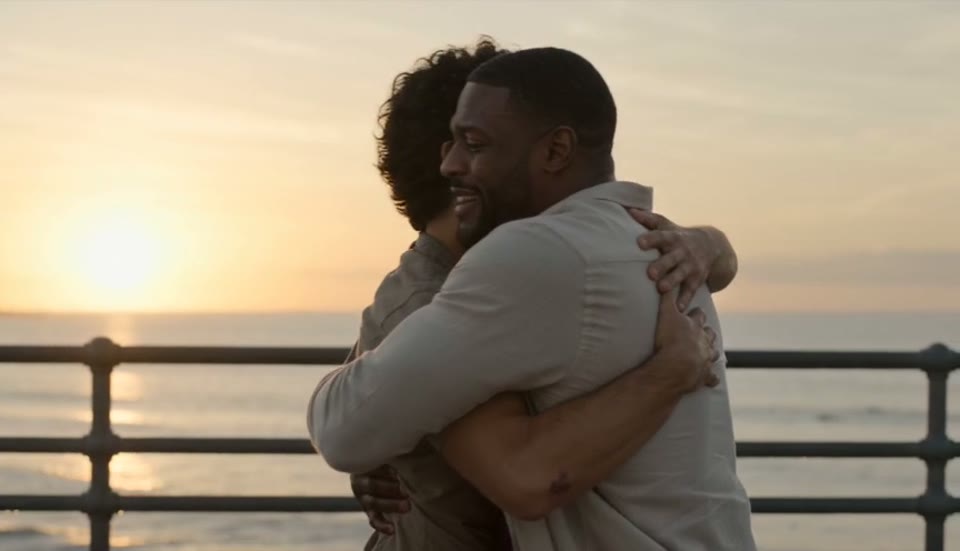
A landscape frame from Lifelong Friends. The wider composition leaves space around the pair, while a portrait version would require its own framing decision.
Compare how much of the setting remains around the characters. The examples demonstrate actual published formats, but they also differ in cast, location and generation. Do not treat those differences as proof that one aspect ratio always produces better motion or likeness.
For a first vertical story, use a gallery case already made in portrait, such as the zombie dog video example. Restore its settings, then replace the references with your own authorized photos. You can change the relationship afterward, but remember that this also changes the story direction.
How do you keep faces and meaningful action easy to see?
A mobile viewer should be able to identify the pair without inspecting a small detail at the extreme edge. Choose readable portraits and avoid covering the recognition moment with a large caption. Review the file on a phone at normal brightness as well as on a larger screen.
- Check the opening close views for recognizable faces.
- Watch the approach for an important subject leaving the frame.
- Pause near the memory transition to inspect continuity.
- Preview your proposed caption over the ending.
- Listen for audio that conflicts with the text or mood.
There is no single safe-text rectangle promised by this tool for every social app. Account interfaces, device shapes and platform layouts can differ. Keep important words away from the edges and verify their placement in the actual upload preview instead of relying on a fixed measurement copied from another app.
Build a caption and subtitle plan
The Publishing kit offers platform choices for TikTok, Reels and Shorts. It prepares draft wording, tags and an SRT file from your story settings. The kit is separate from the renderer, so text preparation does not mean those words have already been spoken or embedded in the MP4.
Make the caption understandable without repeating the whole plot. A brief line about recognition or returning to a familiar person can support the ending. Avoid a claim that the footage records a real frightening incident, and make the AI-generated nature clear when sharing.
For subtitles, inspect every cue against the actual result. A draft can provide a starting structure without perfectly following a generated action that moved earlier or later. Remove wording that contradicts the video, then import the revised SRT or use the platform's text controls.
Preparing a zombie couple TikTok video versus starting blank
The studio connects story choices and publishing drafts, which reduces the number of decisions you need to organize separately. It does not replace a social publishing app or guarantee that the first render will be your preferred version. Keep that distinction in mind when planning time and credits.
| Stage | Prepared ZombieVideo workflow | From a blank prompt |
|---|---|---|
| Beginning | Photo roles and a reunion story are already defined | Introduce characters and explain their connection. |
| Story plan | Select scene, memory and mood | Construct the sequence and emotional change. |
| Adjustments | Use a format selector before rendering | Coordinate the prompt with output settings. |
| Publishing | Prepare caption and SRT drafts separately | Write and time the supporting text yourself. |
| Ending | Review the warm resolution in the delivered MP4 | Plan and inspect your chosen final moment. |
The photo to zombie preparation guide covers an earlier source of avoidable problems: unclear or poorly cropped reference faces. Better input inspection is useful regardless of where the finished video will appear. Choose the photos and story first, then fit the text to the result you actually received.
Download, preview and share deliberately
Save the original video from your account before making social edits. Keep a separate edited copy if you add captions, trim the opening or change audio. This gives you a way to revise a post without repeatedly recompressing the only version you kept.
Use the upload preview to check the first frame, caption placement, sound level and complete ending. A muted preview is not evidence that the downloaded video has no sound, and a good screenshot is not evidence that the whole clip plays smoothly. Test both playback and audio deliberately.
For a zombie couple TikTok video, the last check is whether the viewer can follow the encounter and recognize the warmer resolution. Publish only when the people portrayed are comfortable with the fictional story and your description matches it. Another platform can use the same prepared source file, but each post deserves its own final preview.
Questions before you create
Which format should I choose for a zombie couple TikTok video?
Choose portrait 9:16 before creating a video for a vertical viewing experience. The studio also offers landscape 16:9, but switching the selector afterward does not convert an already completed result. If you need another aspect ratio, either edit the downloaded file or create a separate video with the new setting.
Can the same vertical video be used for Instagram Reels or Shorts?
A portrait MP4 is a practical starting file for these vertical surfaces too. Check the platform preview, captions and audio before each upload, because interface overlays and publishing options differ. This guide explains preparing the file; it does not guarantee platform acceptance, distribution, search reach or a particular number of views.
Are subtitles already inside the downloaded MP4?
The Publishing kit produces a separate SRT draft and caption text. It does not automatically burn those words into the video. Review the timing and wording, then import the SRT into a compatible editor or add text in your publishing app. Keep the original MP4 in case you want to change the captions later.
Can ZombieVideo publish the TikTok post for me?
The studio prepares the video and supporting text, but it does not upload the post to your social account. Download the result, review it and publish through your chosen app. You remain responsible for the caption, audience choices, AI disclosure and any audio you add during the publishing process.
Will the clip include the same music as the example?
New videos request generated sound, so the exact audio may differ from a gallery sample. Listen to your delivered file before adding a second track. If you choose music in a social app, follow the rights and usage options available for your account and intended use; the example does not grant rights to unrelated songs.
Does 9:16 mean the result is 1080 by 1920 pixels?
The ratio describes the frame shape, not the pixel count. Current Standard output requests 480p, while Cinema HD requests 720p. Both can use a 9:16 composition. Check your actual downloaded file when exporting or editing, and do not label it 1080p or 2K solely because it is vertical.