Story
Make a zombie dog video with you and your companion
Plan a zombie dog video from your portrait and a pet photo. Watch a real 15-second example, check the story settings, and prepare your own reunion.
Last updated: 2026-10-25
A zombie dog video works when the animal still feels like a companion, even in the frightening opening. The zombie couple AI video generator includes a Pet relationship for one owner and one animal. This version keeps the reunion idea while asking for animal movement rather than a human-style embrace.
The example below is an actual published ZombieVideo result. It is useful for judging the mood, the visible transformation and the warm ending; it is not a promise that another pet will move identically. Watch the whole clip before choosing whether this fictional story suits your companion.
Watch the zombie dog video before choosing settings
Published owner-and-dog example: 15.104 seconds, portrait 9:16, Standard. The original generated sound is available through the player controls.
The opening asks for a visibly changed animal, while the memory asks for the same companion in a healthy state. Notice whether the familiar coat and face remain recognizable through that change. The final scene should read as relief and affection rather than an animal behaving like a person.
Small details deserve attention: the contact with the owner, the size of the dog and the way its paws meet the ground. Generative video can alter these details even when the larger story is understandable. A short sample is more informative than a promise of perfect anatomy or an untested success percentage.
Which two photos should you use?
Pick a clear portrait of the owner and a separate photograph of the pet. For the animal, a visible face, readable muzzle and distinctive coat markings matter more than a dramatic background. Avoid a photo where the dog is a tiny shape across a park or where a toy hides its mouth.
The owner and animal do not need to have been photographed together. Two separate references can be easier to read than an affectionate selfie with overlapping faces. Use images you own and obtain the person's permission before including their portrait.
| Reference | Look for | Replace it when |
|---|---|---|
| Owner | An unobstructed face in even light | Sunglasses or deep shadow obscure the eyes. |
| Dog | Readable face, coat pattern and natural proportions | Motion blur hides the muzzle or the dog is too small. |
| Both uploads | JPEG, PNG or WebP, up to 10 MiB each | The crop is outside 301–5999 pixels per side. |
For the full shape and file checks, use the photo to zombie preparation guide. Do the crop before setting the story: it is easier to replace a weak reference while you are still comparing portraits. A file that uploads successfully can still be a poor identity reference.
How do you recreate the published Pet setup?
Open Examples in the studio, find Zombie Dog and choose Use. That restores the relationship, scene, portrait format and story choices associated with this case. Supply your own references afterward; choosing an example does not supply an authorized photo of your pet.
- Select Pet for the relationship.
- Put your portrait in photo 1 and the companion in photo 2.
- Choose Overgrown path for the cold setting.
- Use Sunlit meadow for the memory and Tender for the tone.
- Keep Standard and 9:16 to match the example's settings, then review.
The sample uses an empty custom-memory field, so the named memory setting provides the warm location. Starting from this known combination makes it easier to understand which choice you changed. It still creates a separate video from your photos rather than reusing the published dog's movements.
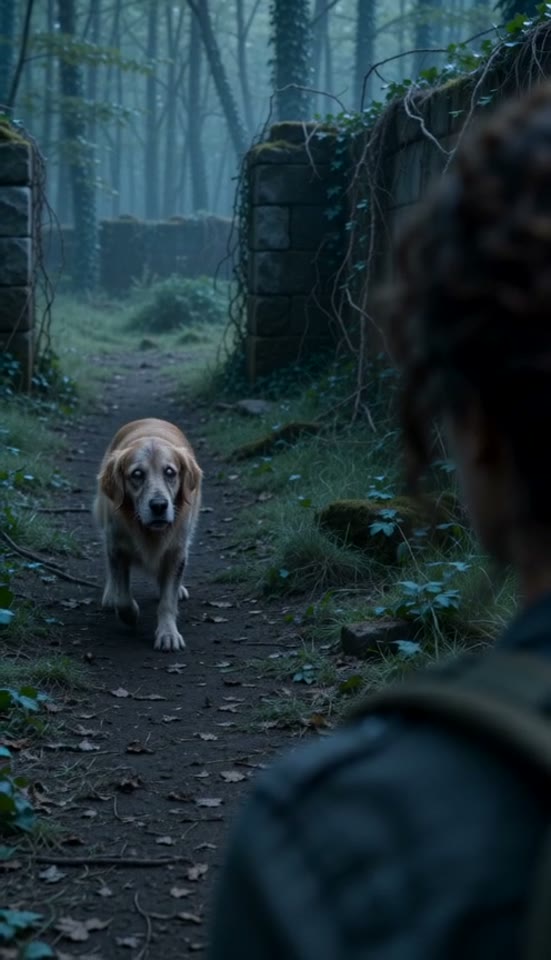
A frame from the actual Pet result. Check the recognizable animal and posture, rather than expecting a human actor in an animal costume.
What changes between the encounter and the memory?
The Pet direction separates the cold and warm appearances. Early shots request a tense, visibly transformed companion and an owner who recognizes it through fear and grief. The approach should remain appropriate to the animal's body and size.
At the planned transition, the setting becomes a warm memory and the pet returns to a healthy appearance. The owner crouches or meets the animal at a natural height, with stroking and nuzzling as the affectionate action. Timing and the precise contact pose can vary in the delivered result.
This matters when choosing a source image of a small or elderly dog. Do not use a custom note to demand an exaggerated leap or a lift that is implausible for the animal. The emotional change can be clear with a quiet approach and a close view of recognition.
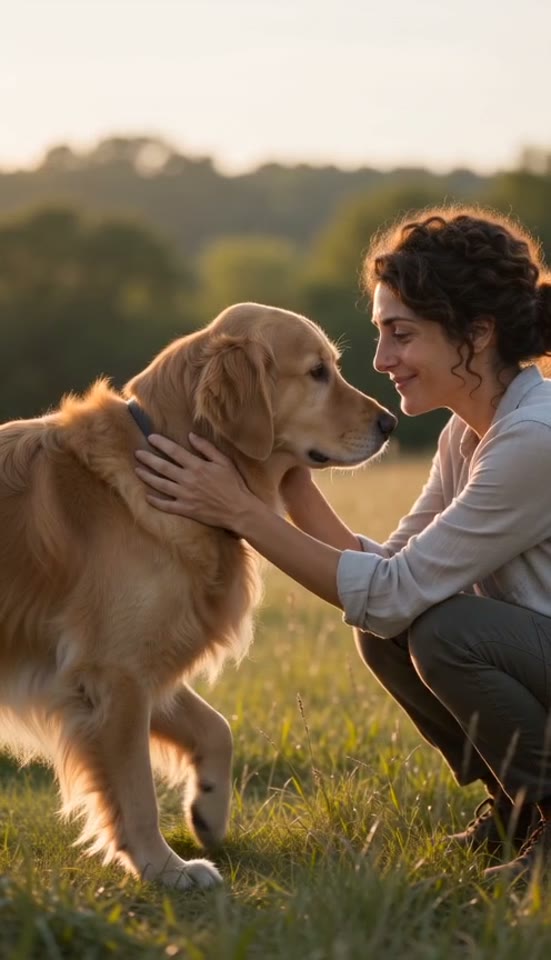
The warm portion of the same generated video. Compare the calmer appearance with the cold encounter.
A pet story versus writing from a blank prompt
The advantage of the Pet option is that the cast and movement direction are already adapted to an owner and an animal. You can spend your attention on the reference photos, location and emotional tone. It does not provide frame-by-frame animation controls or a guarantee about every paw and facial feature.
| Choice | ZombieVideo Pet story | Blank prompt workflow |
|---|---|---|
| Start | Owner and animal have separate reference slots | Explain which reference identifies each subject. |
| Story | Recognition leads into a companion reunion | Write a sequence that fits an animal. |
| Control | Pet relationship, scene, memory and tone | Describe anatomy, movement and emotion explicitly. |
| Format | Portrait or landscape at the review stage | Choose output shape in the generator. |
| Ending | Healthy pet, natural closeness and a warm setting | Specify the restored appearance and final action. |
For a non-romantic story involving two people instead, the AI family reunion video guide explains the Family setting. Keep that choice separate from Pet: it changes who is present and what a plausible reunion looks like. A relationship label is a story instruction, not an extra upload slot.
Review the zombie dog video before sharing
Play the finished result once for the story and again for details. Check whether the pet is identifiable, whether the colder appearance feels appropriate and whether the ending is comfortable to share with the intended audience. Listen to the generated sound before adding any other audio.
Save the original MP4 before editing a caption or trimming a version for a social platform. The Publishing kit can prepare text and an SRT draft, but those words are separate from the video until you add them in an editor or publishing app. Clearly describe the clip as AI-generated so a fictional scene is not mistaken for footage of a real animal in distress.
If the zombie dog video needs a different mood, return to the settings before creating another version and check the credit cost again. A small change can lead to a different creative result, not a controlled edit of the completed file. Keep the version you prefer and share only after reviewing it at normal playback speed.
Questions before you create
How many photos does a zombie dog video need?
Two references are required: one portrait of the owner and one image of the dog. Choose Pet, place the owner in photo 1 and the animal in photo 2. A single pet photo by itself does not complete this workflow, even if you have seen single-photo pet tools elsewhere.
Can I make a zombie cat video using the same controls?
The Pet story can request a cat, using the same owner-first and animal-second arrangement. The published example here is a dog, so it does not demonstrate a tested cat result. Check feline facial details, markings and movement carefully rather than assuming the dog sample guarantees how a cat will appear.
Will the dog keep its real coat markings?
The pet photo supplies an identity reference, including coat color, markings and general proportions. These details can still drift in generated shots. The cold scene also requests a changed zombie appearance, followed by a healthy pet in the warm memory. Judge recognition across both appearances instead of expecting an unchanged photograph.
Is a zombie dog video a reconstruction of a real memory?
It is a fictional AI scene inspired by the references and settings you provide. The warm ending is generated, rather than retrieved from a real event. If the story concerns a pet who has died, choose language that reflects your own feelings and make the fictional nature clear to anyone who sees it.
Can I include two pets and their owner?
The current workflow supports two characters, with two photo references. It does not provide separate identity slots for an owner and multiple pets. Keep one owner and one companion in the story, or plan separate videos. Adding extra animals in a text note cannot guarantee separate, consistent identities.
Does changing the pet prompt make a new render free?
Creating another video uses credits again. Failed renders return their deducted credits automatically, but a completed video with an unwanted creative detail is not automatically a failed job. Inspect the example and choose settings carefully before creation. Standard uses 10 credits; the 720p option uses 22 credits.