Story
An AI family reunion video for two familiar faces
Create an AI family reunion video with two adult portraits. See a father-and-daughter example, choose a warm memory, and keep the relationship clear.
Last updated: 2026-10-25
An AI family reunion video can use the same cold-to-warm story structure without presenting the two characters as romantic partners. The zombie couple AI video generator includes a Family relationship for this purpose. Choose two consenting adults and make the relationship clear before selecting the scene.
The published case follows a father and his adult daughter from a snowy encounter to a sunlit living room. It provides a concrete starting point for story settings, framing and a brief custom memory. The scene remains fictional, even when the references are your own family photographs.
Watch an AI family reunion video with two adults
Actual published Family result: portrait 9:16, Standard, 15.104 seconds. Use the controls to check the original sound and the whole transition.
Pay attention to what establishes the relationship: the age difference, the welcoming gesture and the setting of the final scene. None requires a long caption to explain why these two people matter to each other. A familiar domestic memory gives the ending context without adding more characters.
Also inspect the limitations visible in the clip, including motion and shot changes. Generative footage may compress an action, alter a gesture or shift a facial detail. A real example helps you decide whether the style is suitable, while a still image alone cannot demonstrate the transition.
Which portraits suit a two-person family story?
The story has two character roles, regardless of the number of people in your household. Pick one pair: siblings, a parent and an adult child, or two other adult relatives who have agreed to the portrayal. Decide whose perspective should open the encounter before assigning the uploads.
Photo 1 is the survivor and photo 2 is the infected relative. This is independent of age, gender or which person stands on the left in an old photograph. You can exchange the upload roles before generation, but changing them later does not alter a completed video.
| Decision | Example choice | Why it helps |
|---|---|---|
| Cast | One father and one adult daughter | The story has exactly two identities to carry. |
| Relationship | Family | Requests a caring, non-romantic interaction. |
| Portraits | Separate, clear references | Avoids asking the model to select people from a group. |
| Memory | A welcoming home interior | Makes the emotional change easy to understand. |
Follow the photo to zombie guide if you need to crop an old shared photograph into individual references. A sentimental source is not always a readable source: damage, reflections and tiny faces can leave too little information. Use a clearer image when the model would otherwise have to invent most of the face.
How do you restore the father-and-daughter setup?
In the homepage Examples gallery, choose Use on Family Reunion. The example restores the Family relationship, Snowbound cabin scene, home memory, Hopeful tone, 9:16 format and Standard quality. Check those values before you add your own portraits.
The saved custom memory reads: “A warm, sunlit family living room where a 52-year-old father welcomes his 24-year-old adult daughter home. A caring, non-romantic reunion.” This text describes the example's cast; replace the ages and relationship when they do not describe your planned scene.
- Identify the two adult relatives and obtain permission.
- Choose Family and assign survivor and infected roles.
- Select the cold location and a separate warm memory.
- Add one short description of the relationship and welcoming action.
- Review the faces, format and credit cost before confirming.
The custom-memory field accepts up to 180 characters. Keep it focused on a place, a relationship and an action rather than trying to direct every shot. Too many competing instructions can make it harder to tell which creative choice affected the output.
Why contrast a snowy encounter with a home memory?
Snow creates an immediately readable separation from the sunlit interior. The first setting can feel distant and uncertain; the second brings the same people into a familiar, welcoming space. The emotional turn comes from that change as much as from the embrace itself.

A cold-scene frame from the Family example. The selected snow setting guides the atmosphere, while camera position and staging remain generated.
The scene selector and the memory selector do different jobs. Changing the cold scene does not automatically change the warm place, so check both when adapting this case. A home memory is useful when the important idea is returning to the person rather than visiting a dramatic destination.
You do not need to describe a real address, a family dispute or another private detail to communicate that feeling. A short fictional setting can carry the relationship without disclosing personal history to the processing provider. Include only details you are comfortable using in a creative request.
Give an AI family reunion video a clear ending
The ending should resolve the relationship established at the start. A reassuring welcome, a relaxed expression and a familiar room communicate a family reunion without asking for romantic framing. Review the final movement rather than assuming a text instruction has controlled it perfectly.
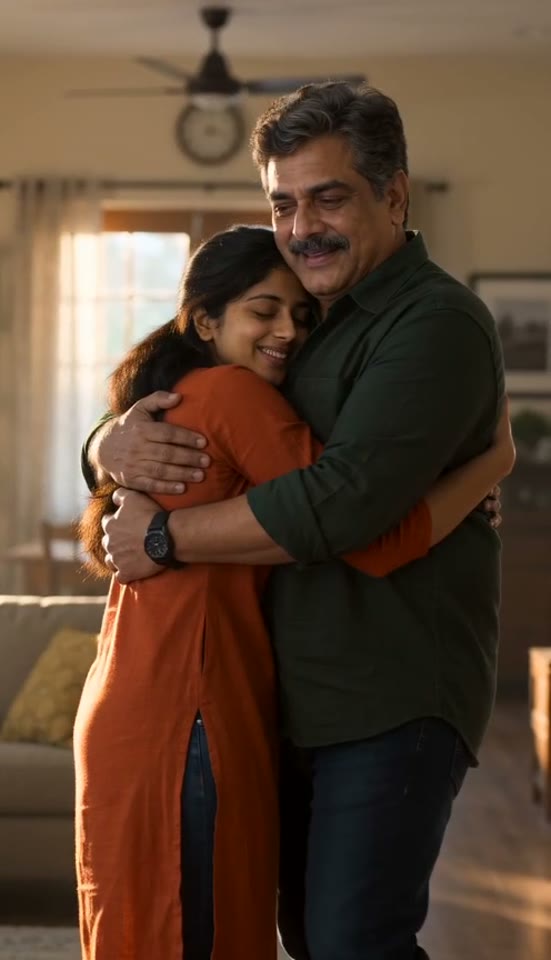
The sunlit memory from the same result. This frame illustrates the intended caring family relationship, not a photograph of an actual reunion.
| Part | ZombieVideo Family setup | Starting without a story preset |
|---|---|---|
| Opening | Two relatives assigned to survivor and infected roles | Define the cast and the emotional conflict. |
| Direction | Family relationship plus a short custom memory | Explain the non-romantic context from scratch. |
| Adjustments | Location, memory and emotional tone | Coordinate those choices in a longer prompt. |
| Output | 15 seconds, 9:16 or 16:9, with sound | Check duration, framing and audio settings. |
| Resolution | Warm memory of the same two characters | Plan a closing action that resolves the encounter. |
The advantage is a prepared sequence with a clear place to state the relationship. It does not provide a group-casting system, a historical reconstruction or precise performance control. If the story should instead center on a companion animal, the zombie dog video guide uses a different relationship and movement direction.
Check the result with your intended audience in mind
Watch for recognizable faces, appropriate gestures and a final scene that feels comfortable to show the people involved. Listen once without other music so you know what is already in the file. Ask the portrayed adults before making an intimate family story public.
Keep the original MP4 and describe any shared version as an AI-generated fictional reunion. A finished AI family reunion video may be meaningful without being exact, but it should never be presented as recovered footage of a real event. If you want another interpretation, check the settings and the cost before creating a separate render.
Questions before you create
Can an AI family reunion video include a whole family group?
The current story uses two reference photos for two characters. It does not offer a cast with three or more independently controlled people. Choose two adult family members for one reunion, or make separate pair stories. A group photo cannot supply extra identity slots merely because several faces are visible.
How do I keep a parent-and-adult-child story non-romantic?
Choose Family and describe the relationship plainly in the custom memory, for example a father welcoming his adult daughter home. Use a familiar domestic setting and avoid couple-oriented language. Review the finished gestures and framing, since a relationship instruction guides the generator but does not guarantee every interaction will follow it.
Which family members appear in the published example?
The example depicts a father and his adult daughter, with a snowy encounter followed by a sunlit living-room memory. It uses the Family setting, Standard quality and 9:16 format. Those are the documented choices for this particular generated result, rather than proof that every age, household or group arrangement has been tested.
Can I use a photograph of a child for this family story?
Use adult subjects for this fictional zombie reunion. The example features an adult daughter, not a child. If you want a story involving a younger relative, do not assume the Family label authorizes that use. Choose consenting adults whose references and intended portrayal are appropriate for the current service.
Will writing a detailed memory reproduce an event that actually happened?
The memory text supplies creative direction for a newly generated scene. It does not recover historical footage, verify an event or preserve the exact room from a personal memory. Keep a short description of the atmosphere and relationship, and label the output as fictional AI imagery when sharing it with family.
Can I download captions with the family video?
The studio Publishing kit prepares caption text and an SRT draft separately from the MP4. It does not automatically burn subtitles into the picture or post on your behalf. Check the words and timing, then add them with your chosen editor or platform before sharing a captioned version.